



MS Excel: How to concatenate strings together (WS, VBA)
This Excel tutorial explains how to use the Excel & operator with syntax and examples.
Description
To concatenate multiple strings into a single string in Microsoft Excel, you can use the & operator to separate the string values.
The & operator can be used as a worksheet function (WS) and a VBA function (VBA) in Excel. As a worksheet function, the & operator can be entered as part of a formula in a cell of a worksheet. As a VBA function, you can use this operator in macro code that is entered through the Microsoft Visual Basic Editor.
Syntax
The syntax for the & operator is:
string1 & string2 [& string3 & string_n]
Parameters or Arguments
- string1, string2, string3, ... string_n
- The string values to concatenate together.
Returns
The & operator returns a string/text value.
Applies To
- Excel for Office 365, Excel 2019, Excel 2016, Excel 2013, Excel 2011 for Mac, Excel 2010, Excel 2007, Excel 2003, Excel XP, Excel 2000
Type of Function
- Worksheet function (WS)
- VBA function (VBA)
Example (as Worksheet Function)
Let's look at some Excel & operator examples and explore hwo you would use the & operator as a worksheet function in Microsoft Excel:
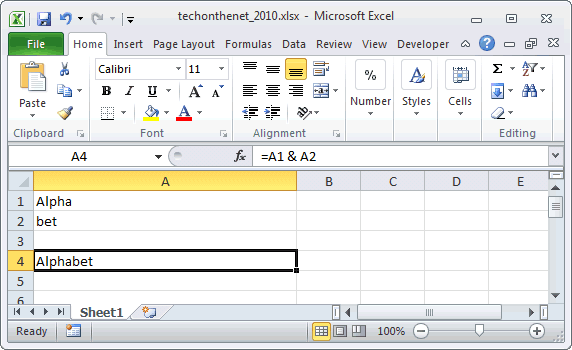
Based on the Excel spreadsheet above, the following & examples would return:
=A1 & A2
Result: "Alphabet"

="Tech on the " & "Net"
Result: "Tech on the Net"

=(A1 & "bet soup")
Result: "Alphabet soup"
Concatenate Space Characters
When you are concatenating values together, you might want to add space characters to separate your concatenated values. Otherwise, you might get a long string with the concatenated values running together. This makes it very difficult to read the results.
Let's look at an easy example.
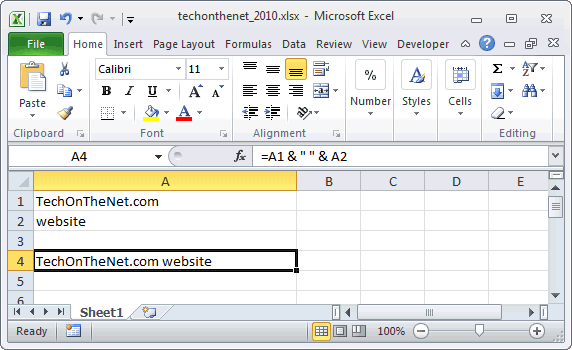
Based on the Excel spreadsheet above, we can concatenate a space character using the & operator as follows:
=A1 & " " & A2
Result: "TechOnTheNet.com website"
In this example, we have used the & operator to add a space character between the values in cell A1 and cell A2. This will prevent our values from being squished together.
Instead our result would appear as follows:
"TechOnTheNet.com website"
Here, we have concatenated the values from the two cells (A1 and A2), separated by a space character.
Concatenate Quotation Marks
Since the & operator will concatenate string values that are enclosed in quotation marks, it isn't straight forward how to add a quotation mark character to the concatenated results.
Let's look at a fairly easy example that shows how to add a quotation mark to the resulting concatenated string using the & operator.
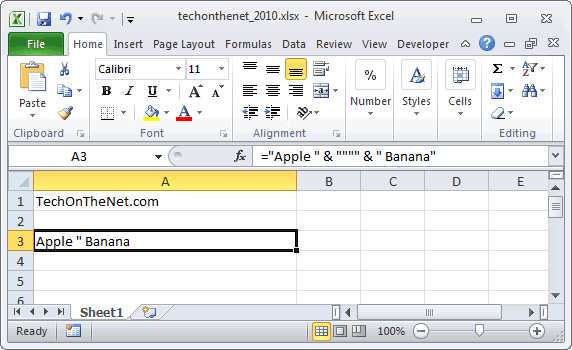
Based on the Excel spreadsheet above, we can concatenate a quotation mark as follows:
="Apple " & """" & " Banana"
Result: Apple " Banana
In this example, we have used the & operator to add a quotation mark to the middle of the resulting string.
Since our strings to concatenate are enclosed in quotation marks, we use 2 additional quotation marks within the surrounding quotation marks to represent a quotation mark in our result as follows:
""""
Then when you put the whole function call together:
="Apple " & """" & " Banana"
You will get the following result:
Apple " Banana
Frequently Asked Questions
Question:For an IF statement in Excel, I want to combine text and a value.
For example, I want to put an equation for work hours and pay. If I am paid more than I should be, I want it to read how many hours I owe my boss. But if I work more than I am paid for, I want it to read what my boss owes me (hours*Pay per Hour).
I tried the following:
=IF(A2<0,"I owe boss" abs(A2) "Hours","Boss owes me" abs(A2)*15 "dollars")
Is it possible or do I have to do it in 2 separate cells? (one for text and one for the value)
Answer: There are two ways that you can concatenate text and values. The first is by using the & character to concatenate:
=IF(A2<0,"I owe boss " & ABS(A2) & " Hours","Boss owes me " & ABS(A2)*15 & " dollars")
Or the second method is to use the CONCATENATE function:
=IF(A2<0,CONCATENATE("I owe boss ", ABS(A2)," Hours"), CONCATENATE("Boss owes me ", ABS(A2)*15, " dollars"))
Example (as VBA Function)
Let's look at some Excel & operator function examples and explore how to use the & operator in Excel VBA code:
The & operator can be used to concatenate strings in VBA code. For example:
Dim LValue As String

LValue = "Alpha" & "bet"
The variable LValue would now contain the value "Alphabet".
Frequently Asked Questions
Question:For an IF statement in Excel, I want to combine text and a value.
For example, I want to put an equation for work hours and pay. If I am paid more than I should be, I want it to read how many hours I owe my boss. But if I work more than I am paid for, I want it to read what my boss owes me (hours*Pay per Hour).
I tried the following:
=IF(A2<0,"I owe boss" abs(A2) "Hours","Boss owes me" abs(A2)*15 "dollars")
Is it possible or do I have to do it in 2 separate cells? (one for text and one for the value)
Answer: There are two ways that you can concatenate text and values. The first is by using the & character to concatenate:
=IF(A2<0,"I owe boss " & ABS(A2) & " Hours","Boss owes me " & ABS(A2)*15 & " dollars")
Or the second method is to use the CONCATENATE function:
=IF(A2<0,CONCATENATE("I owe boss ", ABS(A2)," Hours"), CONCATENATE("Boss owes me ", ABS(A2)*15, " dollars"))
Advertisements