



MS Excel: How to use the ISBLANK Function (WS)
This Excel tutorial explains how to use the Excel ISBLANK function with syntax and examples.
Description
The Microsoft Excel ISBLANK function can be used to check for blank or null values.
The ISBLANK function is a built-in function in Excel that is categorized as an Information Function. It can be used as a worksheet function (WS) in Excel. As a worksheet function, the ISBLANK function can be entered as part of a formula in a cell of a worksheet.
Syntax
The syntax for the ISBLANK function in Microsoft Excel is:
ISBLANK( value )
Parameters or Arguments
- value
- The value that you want to test. If value is blank, this function will return TRUE. If value is not blank, the function will return FALSE.
Note
- See also the ISEMPTY function (VBA function).
Returns
The ISBLANK function returns TRUE if the value is blank.
The ISBLANK function returns FALSE if the value is not blank.
Applies To
- Excel for Office 365, Excel 2019, Excel 2016, Excel 2013, Excel 2011 for Mac, Excel 2010, Excel 2007, Excel 2003, Excel XP, Excel 2000
Type of Function
- Worksheet function (WS)
Example (as Worksheet Function)
Let's look at some Excel ISBLANK function examples and explore how to use the ISBLANK function as a worksheet function in Microsoft Excel:
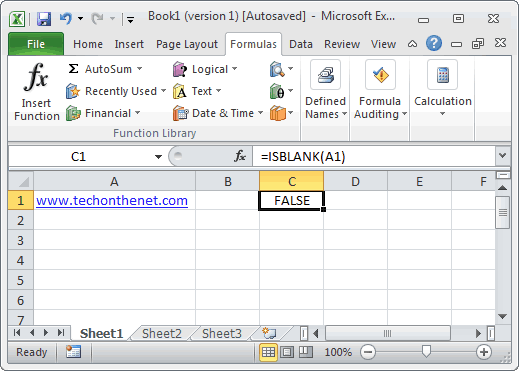
Based on the Excel spreadsheet above, the following ISBLANK examples would return:
=ISBLANK(A1)
Result: FALSE

=ISBLANK(A2)
Result: TRUE

=ISBLANK("Tech on the Net")
Result: FALSE
Frequently Asked Questions
Question:I am trying to get Excel to check different boxes and check if there is text/numbers listed in the cells and then spit out "Complete" if all 5 Boxes have text/Numbers or "Not Complete" if one or more is empty. This is what I have so far and it doesn't work.
=IF(OR(ISBLANK(J2),ISBLANK(M2),ISBLANK(R2),ISBLANK (AA2),ISBLANK (AB2)),"Not Complete","")
Answer:First, you are correct in using the ISBLANK function, however, you have a space between ISBLANK and (AA2), as well as ISBLANK and (AB2). This might seem insignificant, but Excel can be very picky and will return a #NAME? error. So first you need to eliminate those spaces.
Next, you need to change the ELSE condition of your IF function to return "Complete".
You should be able to modify your formula as follows:
=IF(OR(ISBLANK(J2),ISBLANK(M2),ISBLANK(R2),ISBLANK(AA2),ISBLANK(AB2)), "Not Complete", "Complete")
Now if any of the cell J2, M2, R2, AA2, or AB2 are blank, the formula will return "Not Complete". If all 5 cells have a value, the formula will return "Complete".
Advertisements