



MS Access 2003: Project Explorer in VBA Environment
This MSAccess tutorial explains the Project Explorer within the VBA environment in Access 2003 (with screenshots and step-by-step instructions).
See solution in other versions of MSAccess:
Project Explorer
The Microsoft Visual Basic window displays your VBA environment:
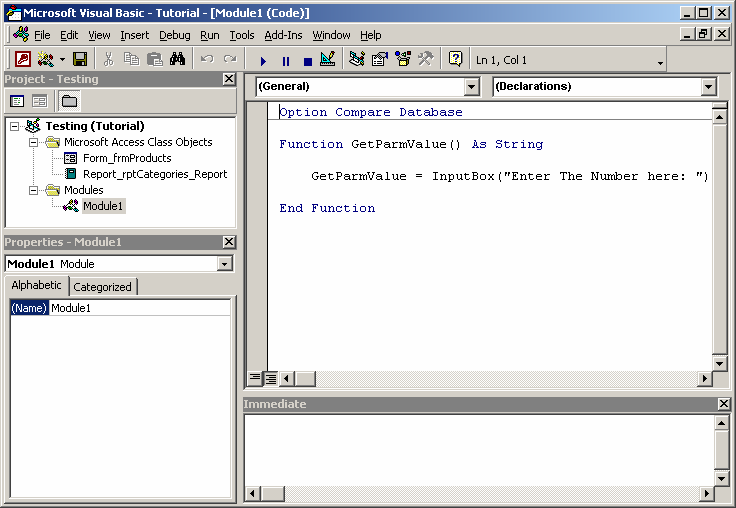
Next, let's take a few moments to analyze the various sections in the Microsoft Visual Basic window.
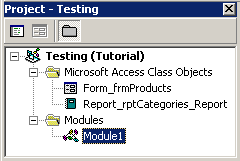
The Project Explorer can usually be found in the top left portion of the Microsoft Visual Basic window. It is a hierarchical listing of the objects recognized by VBA.
In this example, there are two "Microsoft Access Class Objects" - one is a form called frmProducts and the other is a report called rptCategories_Report. There is also one Module called Module1.
These are all objects that you've created in your Access database that the VBA environment is aware of. The Project Explorer may not display all of your Access objects.
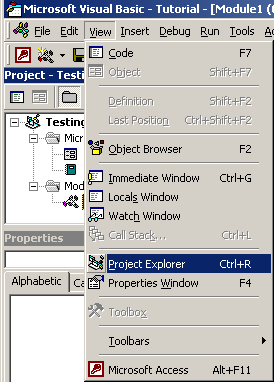
If the Project Explorer is not visible when you open the Microsoft Visual Basic window, you can make it visible by selecting Project Explorer under the View menu.


Advertisements