



MS Access: Mid Function
This MSAccess tutorial explains how to use the Access Mid function with syntax and examples.
Description
The Microsoft Access Mid function extracts a substring from a string (starting at any position).
Syntax
The syntax for the Mid function in MS Access is:
Mid ( text, start_position, [number_of_characters] )
Parameters or Arguments
- text
- The string that you wish to extract from.
- start_position
- The position in the string that you will begin extracting from. The first position in the string is 1.
- number_of_characters
- Optional. The number of characters that you wish to extract. If you omit this parameter, the Mid function will return all characters after the start_position.
Applies To
The Mid function can be used in the following versions of Microsoft Access:
- Access 2019, Access 2016, Access 2013, Access 2010, Access 2007, Access 2003, Access XP, Access 2000
Example
Let's look at how to use the Mid function in MS Access:
Mid ("Tech on the Net", 1, 4)
Result: "Tech"

Mid ("Alphabet", 5, 2)
Result: "ab"

Mid ("Alphabet", 5)
Result: "abet"
Example in VBA Code
The Mid function can be used in VBA code in Microsoft Access.
For example:
Dim LResult As String

LResult = Mid ("Alphabet", 5, 2)
The variable LResult would now contain the value of "ab".
If you omitted the number_of_characters parameter in the above example:
Dim LResult As String

LResult = Mid ("Alphabet", 5)
The variable LResult would now contain the value of "abet", since omitting the final parameter will return all characters after the start_position.
Example in SQL/Queries
You can also use the Mid function in a query in Microsoft Access.
For example:
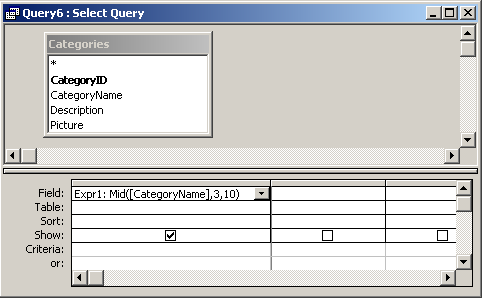
In this query, we have used the Mid function as follows:
Expr1: Mid([CategoryName],3,10)
This query will return 10 characters from the CategoryName field starting with the 3rd position in the string. The results will be displayed in a column called Expr1. You can replace Expr1 with a column name that is more meaningful.
For example:
PartialName: Mid([CategoryName],3,10)
The results would now be displayed in a column called PartialName.
Advertisements