



MS Access: DateValue Function
This MSAccess tutorial explains how to use the Access DateValue function with syntax and examples.
Description
The Microsoft Access DateValue function converts a string to a date.
Syntax
The syntax for the DateValue function in MS Access is:
DateValue ( string_date )
Parameters or Arguments
- string_date
- A string representation of a date. The string_date can be a date ranging from January 1, 100 to December 31, 9999. It can include a time component, if desired.
Returns
The DateValue function returns a date value.
Note
- If string_date includes numbers separated by slashes (or other date separators), then the DateValue function will use your Window's Short Date format to determine the order of the year, month, and day components.
- If string_date does not include the year component of the date, the DateValue function will use the current year.
Applies To
The DateValue function can be used in the following versions of Microsoft Access:
- Access 2019, Access 2016, Access 2013, Access 2010, Access 2007, Access 2003, Access XP, Access 2000
Example
Let's look at how to use the DateValue function in MS Access:
DateValue ("June 30, 2004")
Result: 6/30/2004

DateValue ("6/30/2004")
Result: 6/30/2004

DateValue ("June 30")
Result: 6/30/2004
Example in VBA Code
The DateValue function can be used in VBA code in Microsoft Access.
For example:
Dim LDate As Date

LDate = DateValue ("May 15, 2003")
In this example, the variable called LDate would now contain the value of 5/15/2003.
Example in SQL/Queries
You can also use the DateValue function in a query in Microsoft Access.
For example:
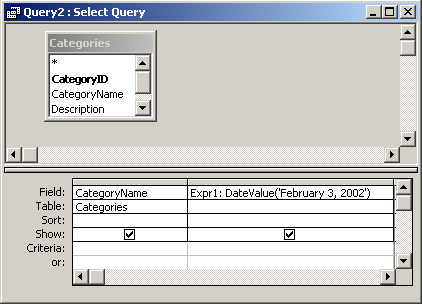
In this query, we have used the DateValue function as follows:
Expr1: DateValue('February 3, 2002')
This query will take a string representation of "February 3, 2002" and return its date value in a column called Expr1. You can replace Expr1 with a column name that is more meaningful.
For example:
NewDate: DateValue('February 3, 2002')
The results would now be displayed in a column called NewDate.
Advertisements