



MS Access: GetAttr Function
This MSAccess tutorial explains how to use the Access GetAttr function with syntax and examples.
Description
The Microsoft Access GetAttr function returns an integer that represents the attributes of a file, folder, or directory.
Syntax
The syntax for the GetAttr function in MS Access is:
GetAttr ( path )
Parameters or Arguments
- path
- The path to a file, folder, or directory that you wish to retrieve the attributes for.
Return Values
The GetAttr function will return one or a combination of the following values:
| VB Constant | Value | Explanation |
|---|---|---|
| vbNormal | 0 | Normal |
| vbReadOnly | 1 | Read-only |
| vbHidden | 2 | Hidden |
| vbSystem | 4 | System file |
| vbDirectory | 16 | Directory or folder |
| vbArchive | 32 | File has been changed since last backup |
| vbAlias | 64 | File name is an alias |
The VB Constants can only be referenced in VBA code and can not be used in Access queries.
Returns
The GetAttr function returns an integer value.
Applies To
The GetAttr function can be used in the following versions of Microsoft Access:
- Access 2019, Access 2016, Access 2013, Access 2010, Access 2007, Access 2003, Access XP, Access 2000
Example
Let's look at how to use the GetAttr function in MS Access:
GetAttr ("C:\instructions.doc")
Result: 0

GetAttr ("H:\Documents\Supplies.xls")
Result: 1
Example in VBA Code
The GetAttr function can be used in VBA code in Microsoft Access.
For example:
Dim LResult As Integer

LResult = GetAttr ("C:\instructions.doc")
In this example, the variable called LResult would now contain the integer representation of the attributes of the instructions.doc file.
Example in SQL/Queries
You can also use the GetAttr function in a query in Microsoft Access.
For example:
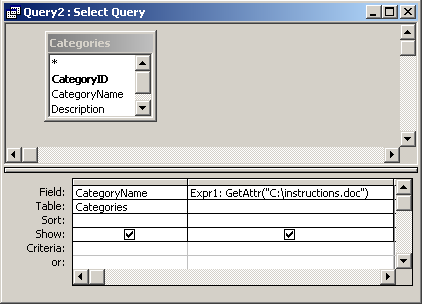
In this query, we have used the GetAttr function as follows:
Expr1: GetAttr("C:\instructions.doc")
This query will return an integer representation of the attributes of the file called instructions.doc. The results will be displayed in a column called Expr1. You can replace Expr1 with a column name that is more meaningful.
For example:
FileInfo: GetAttr("C:\instructions.doc")
The results would now be displayed in a column called FileInfo.
Advertisements