



MS Access 2003: When a record is deleted in a parent table, the child records are deleted also
This MSAccess tutorial explains how to cascade delete so that when a parent record is deleted, the child record is also deleted in Access 2003 (with screenshots and step-by-step instructions).
Question:In Access 2003/XP/2000/97 when a record is deleted in a parent table, how do I get the child records to be deleted as well?
Answer: Under the Tools menu, select Relationships.
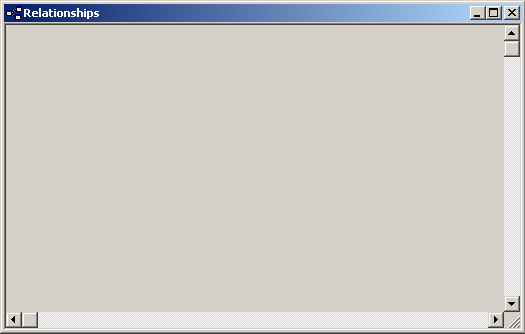
The Relationships window should appear. Under the Relationships menu, select Show Table.
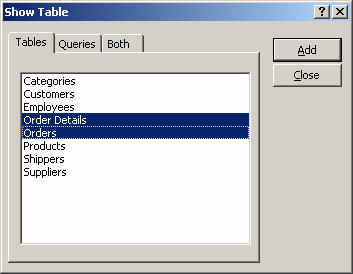
Highlight the tables that you wish to establish a parent-child relationship for. In this example, we are selecting the Order Details and Orders tables.
Click on the Add button. When you are done adding tables to the relationships window, click on the Close button.
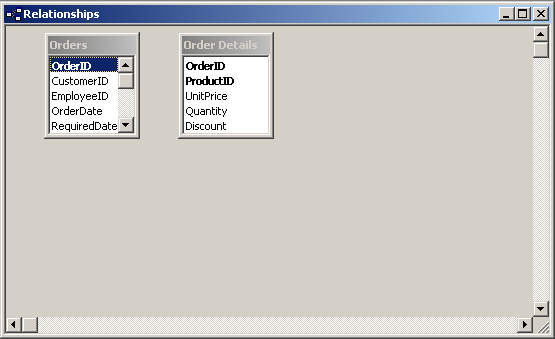
You should now see your tables in the Relationships window. Highlight the field in the Master table that links itself to the Child table. Drag the highlighted field to the comparable field in the Child table.
In this example, the Master table is the Orders table and the Child table is the Order Details table. We are going to link these two tables based on the OrderID field.
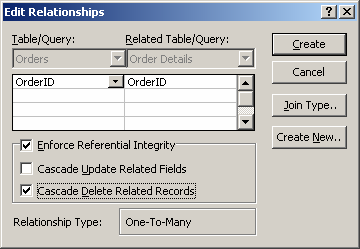
An "Edit Relationships" window should appear, click on the "Enforce Referential Integrity" checkbox. Then click on the "Cascade Delete Related Records" checkbox. Click on the Create button.
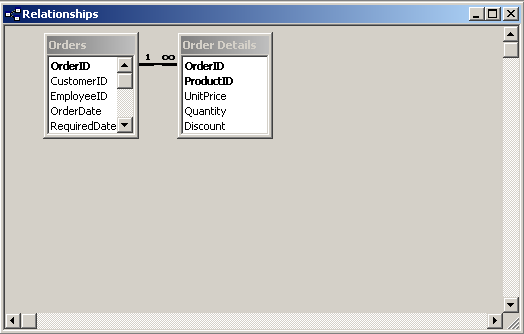
You will return to the Relationships window where you'll see the two tables linked by OrderID. Now when you delete a record from the Orders table, all related records in the Order Details table will also be deleted.
Advertisements