



MS Access 2007: Create an auto-increment field in a table
This MSAccess tutorial explains how to create an auto-increment field in a table in Access 2007 (with screenshots and step-by-step instructions).
See solution in other versions of Access:
Question: In Microsoft Access 2007, how can I create a numeric field in a table that automatically increments?
Answer: To create a numeric field that automatically increments, you need to create an AutoNumber field.
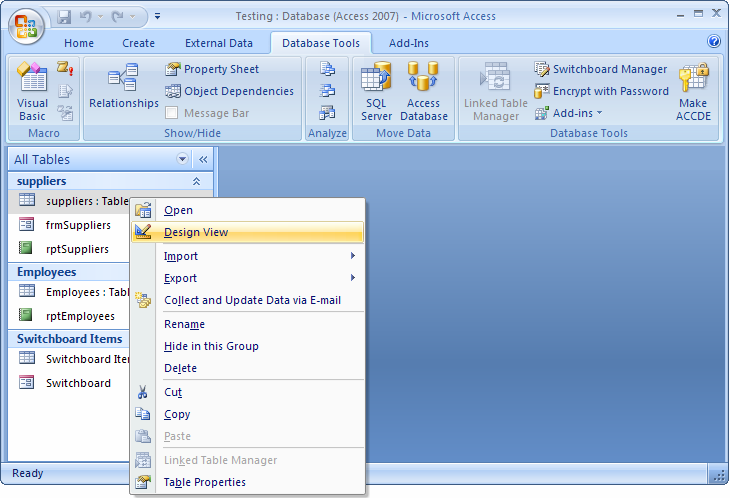
To do this, open your table in design view by right-clicking on the table name in the left window and selecting Design View from the popup menu.
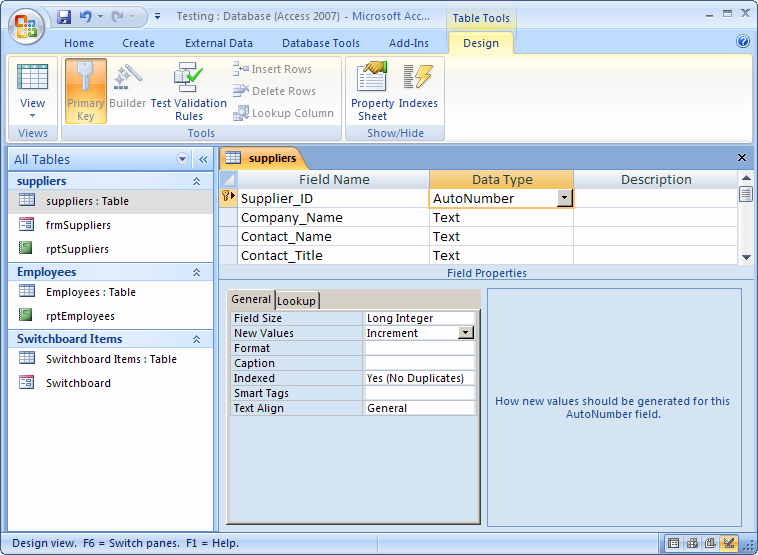
Next, create a new field in your table. Select the data type called "AutoNumber".
In the example below, we've created an AutoNumber field called Supplier_ID.
Advertisements