



MS Access 2000: Prevent a query from timing out
This MSAccess tutorial explains how to prevent a query from timing out in Access 2000 (with screenshots and step-by-step instructions).
See solution in other versions of Access:
Question: In Microsoft Access 2000/97, I keep getting an ODBC timeout error when I run my query. How can I prevent the query from timing out?
Answer: Open your query in design view. Under the View menu, select Properties.
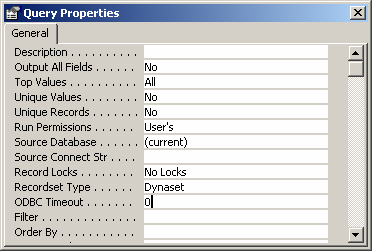
When the "Query Properties" window appears, set the "ODBC Timeout" property to 0.
By default, it will be set to 60 which means that the query will timeout after 60 seconds. By changing the ODBC timeout value to 0, Access will never timeout.
This property is specific to the query that you are working on. So if you have any problems with other queries, you will need to repeat the same steps on each of those queries.
Advertisements