



MS Access 2003: Query to retrieve the number of customers with a certain shoe size
This MSAccess tutorial explains how to create a query to retrieve the number of customers with a certain shoe size in Access 2003 (with screenshots and step-by-step instructions).
Question: In Microsoft Access 2003/XP/2000/97, I have a table of customers and their information like shoe size and shirt sizes. I want to create a query that adds up all the people with a each shoe size and get a total.
For example, if I have 30 customers, I want the query to add up all the customers with shoe size 7 to get the total.
Answer: To do this, you will need to use the Count function.
Create a new query and click on the Totals button in the toolbar. (This is the button with the summation symbol). Then create a query like the one below.
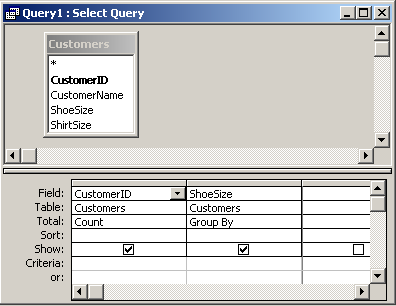
This query will return the total customers for each shoe size.
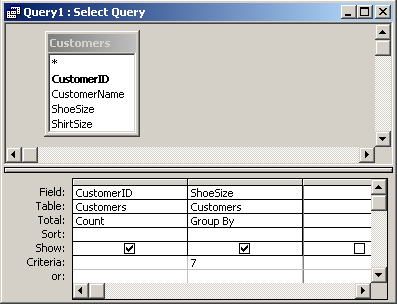
If you wish to return only the total customers that have a shoe size of 7, you can run the following query:
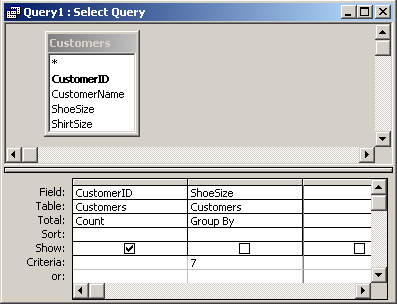
If you wish to return the total customers that have a shoe size of 7, but you do not want to display the shoe size column, you can uncheck the checkbox for the ShoeSize column as follows:
Advertisements