



MS Access 2003: Create a query that accepts a barcode number as a parameter
This MSAccess tutorial explains how to create a query that accepts a barcode number as a parameter in Access 2003 (with screenshots and step-by-step instructions).
Question: In Microsoft Access 2003/XP/2000/97, I'd to create a query where the user can enter a specific barcode number and view all of the entries pertaining to that number. How can I do this?
Answer: You can create a parameter query that prompts for a barcode number.
To do this, first create your query.
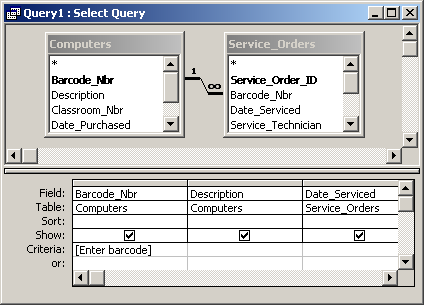
Then enter your barcode parameter. Parameters should be enclosed in square brackets as follows:
[Enter barcode]
This will create a parameter called [Enter barcode].
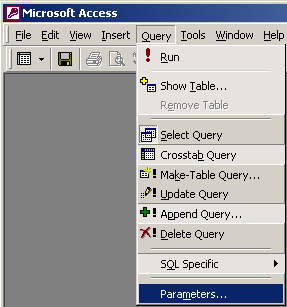
Next, you probably want to ensure that the user enters a valid number in the barcode parameter. To do this, select Parameters under the Query menu.
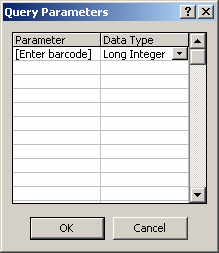
When the Query Parameters window appears, enter the parameter called [Enter barcode], and select Long Integer as the data type. Click on the OK button.
Now, when you run the query, you will be prompted to enter a barcode number.
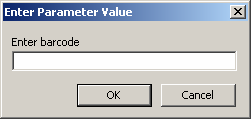
Your query will then only return the records where the barcode matches the parameter value entered by the user.
Advertisements