



MS Access 2003: Query to retrieve max value but display all columns from original table
This MSAccess tutorial explains how to create a query to retrieve the max value but also display all columns from the original table in Access 2003 (with screenshots and step-by-step instructions).
See solution in other versions of Access:
Question: In Microsoft Access 2003/XP/2000/97, I have a table with following columns:
| col1 | col2 | col3 |
|---|---|---|
| a01 | 5 | Pete |
| a01 | 4 | John |
| a01 | 3 | Don |
| a02 | 7 | Elsa |
| a02 | 8 | Rick |
| a03 | 9 | Betty |
| a03 | 10 | Vera |
| a03 | 8 | Ronald |
With a query, I want to reach the records with the highest number in col2 as follows:
| col1 | col2 | col3 |
|---|---|---|
| a01 | 5 | Pete |
| a02 | 8 | Rick |
| a03 | 10 | Vera |
I want to get those records and all of the columns in the records, when I try to do this with:
Select MAX(col 2), col1 from Table1 group by col1;
I only get two columns, col1 and col2. I want all columns, do you know where I'm going wrong?
Answer: To do this, you'll need to create two Access queries to retrieve your desired results. We've created a sample Access database that you can download that contains the queries used to demonstrate this example.
Download version in Access 2000
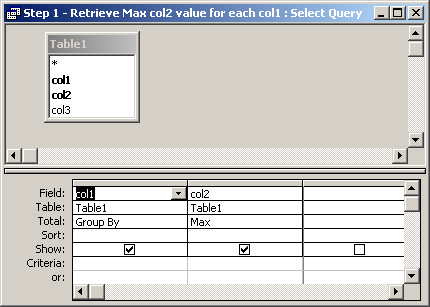
First, you need to create a query that retrieves the highest number in col2 for each col1 value. We've created a query called "Step 1 - Retrieve Max col2 value for each col1".
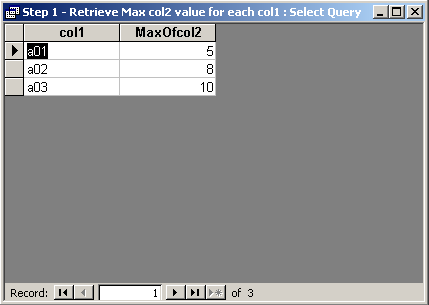
The results for this query are as follows:
Now, we are still missing the col3 value from our result set. To retrieve all columns but still only the highest col2 values, we need to create a second query that takes the results from the first query and joins back to the original table.
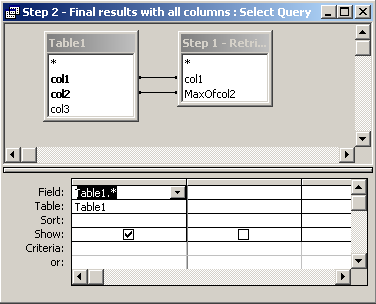
We've called this query as "Step 2 - Final results with all columns". The trick to this query is to make sure that you join col1 in Table1 against col1 in our first query. But also join col2 in Table1 against the "MaxOfcol2" in the first query.
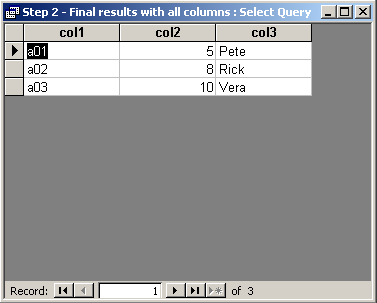
Now when we run this second query, we get our desired results.
Advertisements