



MS Access 2003: Create a query whose LIKE clause gets its condition from a text box
This MSAccess tutorial explains how to create a query where the LIKE clause gets its condition from a text box in Access 2003 (with screenshots and step-by-step instructions).
Question: In Microsoft Access 2003/XP/2000/97, how can I set up a query so that the LIKE clause gets its condition from a text box on my form?
Answer: We'll demonstrate how to do this with the example below.
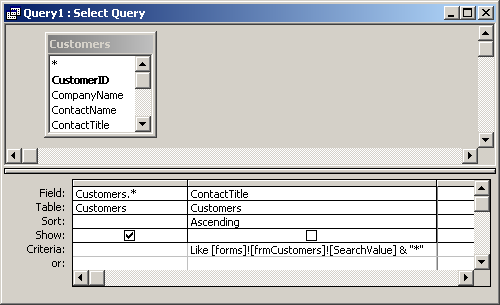
In this example, we have a form called frmCustomers that has a text box called SearchValue.
We've then set up a query that uses a LIKE condition whose condition comes from the SearchValue field on the frmCustomers form. As indicated by:
Like [forms]![frmCustomers]![SearchValue] & "*"
This query will return all records from the Customers table where the ContactTitle field starts with the value entered in the SearchValue field.
So if "Manager of " was entered in the SearchValue field. The query would return all records from the Customers table where ContactTitle begins with "Manager of ".
Advertisements