



MS Access 2003: Retrieve the user name from Windows
This MSAccess tutorial explains how to retrieve the user name from Windows in Access 2003 (with screenshots and step-by-step instructions).
Question: In Microsoft Access 2003/XP/2000/97, how can I retrieve the name of the user logged into Windows?
Answer: To retrieve the user name from Windows, create a new Module in Access.
Paste the following code into the Module:
Declare Function WNetGetUser Lib "mpr.dll" _
  Alias "WNetGetUserA" (ByVal lpName As String, _
  ByVal lpUserName As String, lpnLength As Long) As Long

Const NoError = 0           'The Function call was successful

Function GetUserName() As String

   Dim LUserName As String
   Const lpnLength As Integer = 255
   Dim status As Integer
   Dim lpName

   ' Assign the buffer size constant to lpUserName.
   LUserName = Space$(lpnLength + 1)

   ' Get the log-on name of the person using product.
   status = WNetGetUser(lpName, LUserName, lpnLength)

   ' See whether error occurred.
   If status = NoError Then
      ' This line removes the null character. Strings in C are null-
      ' terminated. Strings in Visual Basic are not null-terminated.
      ' The null character must be removed from the C strings to be used
      ' cleanly in Visual Basic.
      LUserName = Left$(LUserName, InStr(LUserName, Chr(0)) - 1)

   Else
      ' An error occurred.
      MsgBox "Unable to get the name."
      End
   End If

   GetUserName = LUserName

End Function
Your module should now look something like this:
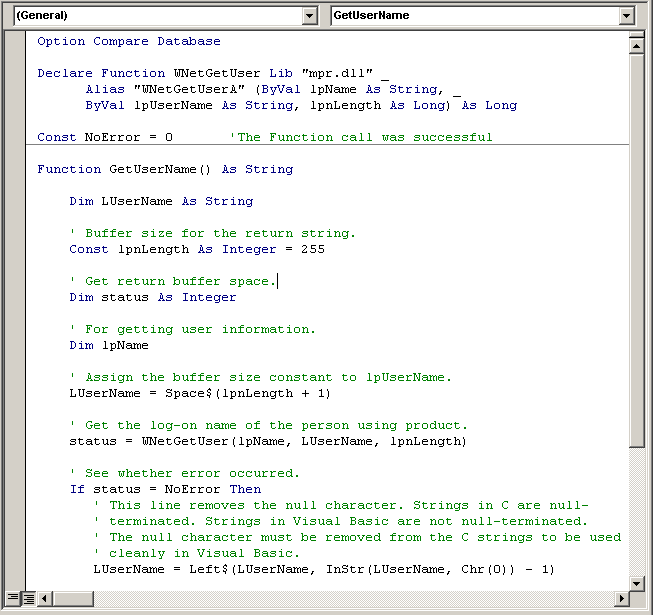
You can now reference this function to retrieve the user name from Windows.
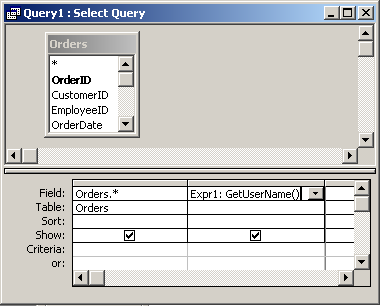
For example, you could reference the function called GetUserName in a query as follows:
Advertisements