



MS Access 2003: Access a value from a table using VBA code
This MSAccess tutorial explains how to retrieve a value from a table using VBA code in Access 2003 (with screenshots and step-by-step instructions).
Question: In Microsoft Access 2003/XP/2000/97, how can I access a value directly from a table using VBA code?
Answer: To access a value directly from a table using VBA code, you first need to create a new Module. To do this, open the Database window, select the Modules tab and click on the New button.
When the Microsoft Visual Basic window appears, you can create a new function to retrieve the value from the table. In our example, we're going to create a function called GetGST that retrieves the GST field from a table called GST.
We've pasted the following code into our new module:
Function GetGST() As String

   Dim db As Database
   Dim Lrs As DAO.Recordset
   Dim LSQL As String
   Dim LGST As String

   'Open connection to current Access database
   Set db = CurrentDb()

   'Create SQL statement to retrieve value from GST table
   LSQL = "select GST from GST"

   Set Lrs = db.OpenRecordset(LSQL)

   'Retrieve value if data is found
   If Lrs.EOF = False Then
      LGST = Lrs("GST")
   Else
      LGST = "Not found"
   End If

   Lrs.Close
   Set Lrs = Nothing

   GetGST = LGST

End Function
You should now be able to reference this new function in a query, form, report, etc.
The query below depicts how you could reference the function called GetGST in a query.
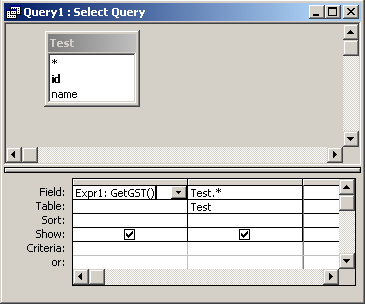
If after trying this example, you receive a "not defined" error on the "Dim db as Database" declaration, you will need to follow some additional instructions.
Advertisements