



MS Excel 2003: Count the number of cells with a particular font color
This Excel tutorial explains how to count the number of cells with a particular font color in Excel 2003 and older versions (with screenshots and step-by-step instructions).
Question: In Microsoft Excel 2003/XP/2000/97, how can I count the number of cells that have a particular font color. For example, I want to count the number of cells that have a red font color. How can I do this?
Answer:Let's look at an example.
Download Excel spreadsheet (as demonstrated below)
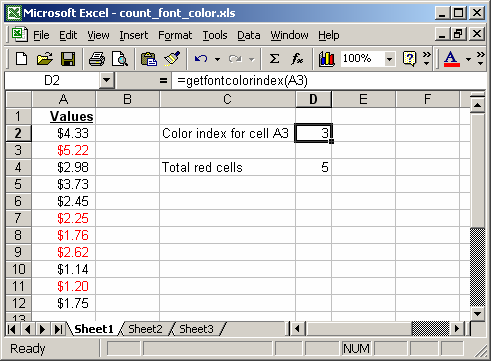
In this example, we have values in column A that have a red font. So first we need to determine the index number for the red font. To do this, we've created a function called GetFontColor. In cell D2, we've created the following formula:
=getfontcolorindex(A3)
This function returns 3 which is the color index for the red font used in column A, specifically cell A3.
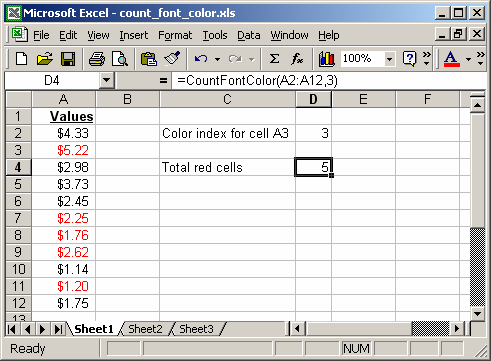
Next, we want to count how many cells have a red font in column A. To do this, we've created the following formula in cell D4:
=CountFontColor(A2:A12,3)
This formula returns the number of cells in range (A2:A12) that have a font color index of 3.
You can view the VBA code by pressing Alt+F11.
Macro Code
The VBA code for the GetFontColorIndex function is:
Function GetFontColorIndex(pRange As Variant) As Integer

   Set pRange = pRange.Areas(1)

   GetFontColorIndex = pRange.Cells(1, 1).Font.ColorIndex

End Function
The VBA code for the CountFontColor function is:
Function CountFontColor(pRange As Variant, pIndex As Integer) As Integer

   Dim LTestRange As Variant
   Dim i As Long, j As Long, m As Long, n As Long
   Dim LTotal As Integer

   Set pRange = pRange.Areas(1)

   LTotal = 0

   m = pRange.Rows.Count
   n = pRange.Columns.Count
   LTestRange = pRange.Value

   For i = 1 To m
      For j = 1 To n
         If pRange.Cells(i, j).Font.ColorIndex = pIndex Then
            LTotal = LTotal + 1
         End If
      Next j
   Next i

   CountFontColor = LTotal

End Function
Advertisements