



MS Excel 2011 for Mac: Automatically refresh pivot table when file is opened
This Excel tutorial explains how to automatically refresh a pivot table when the spreadsheet file is opened in Excel 2011 for Mac (with screenshots and step-by-step instructions).
See solution in other versions of Excel:
Question: In Microsoft Excel 2011 for Mac, how do I get a pivot table to automatically refresh when the Excel spreadsheet is opened?
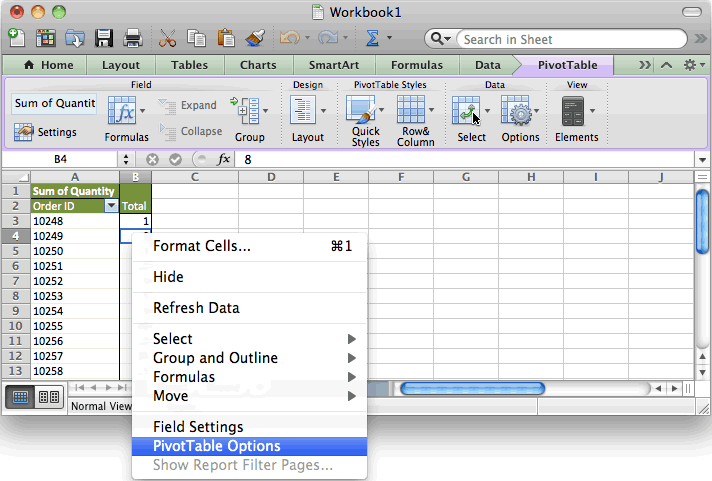
Answer: Right-click on the pivot table and then select "PivotTable Options" from the popup menu.
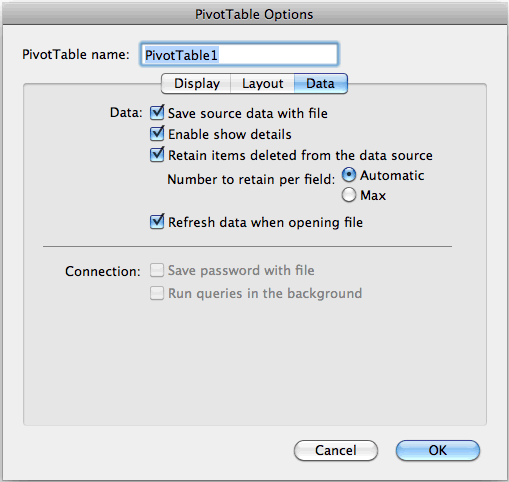
When the PivotTable Options window appears, select the Data tab and check the checkbox called "Refresh data when opening file". Click on the OK button.
Advertisements