



MS Excel 2003: Insert a new column
This Excel tutorial explains how to insert a column in Excel 2003 and older versions (with screenshots and step-by-step instructions).
See solution in other versions of Excel:
Question: How do I insert a new column in Microsoft Excel 2003/XP/2000/97?
Answer: Select a cell to the right of where you wish to insert the new column. In this example, we've selected cell B1 because we want to insert a new column between column A and column B.
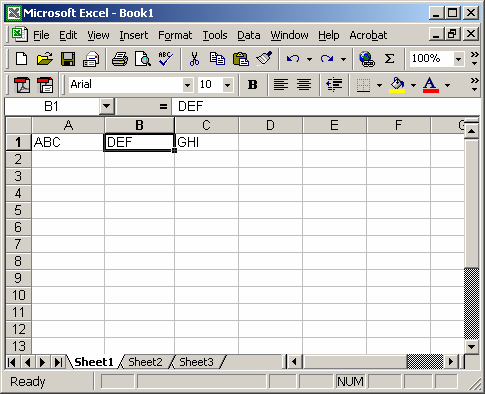
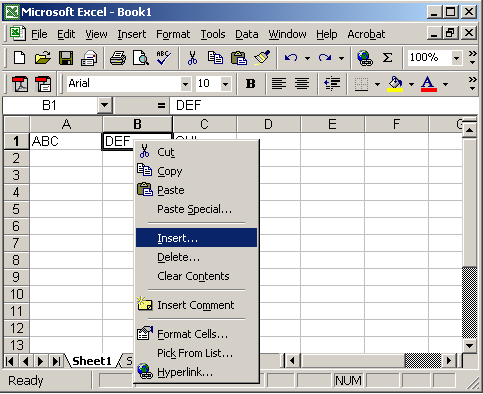
Right-click and select "Insert" from the popup menu.
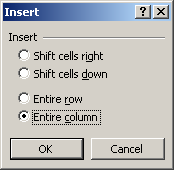
When the Insert window appears, click on the "Entire column" selection and click on the OK button.
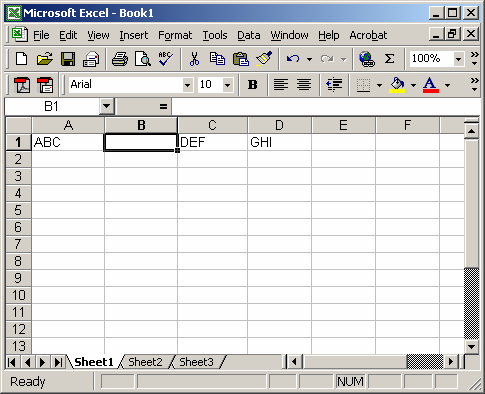
A new column should now be inserted in the spreadsheet. In this example, we've inserted a new column into column B. All of the columns to the right of column B will be shifted to the right.


Advertisements