



MS Access 2003: Automatically start up switchboard when database is opened
This MSAccess tutorial explains how to setup the switchboard so that is opens automatically when the database is opened in Access 2003 (with screenshots and step-by-step instructions).
See solution in other versions of Access:
Question: In Microsoft Access 2003/XP/2000/97, my switchboard is not opening when I open my application. How do I fix it?
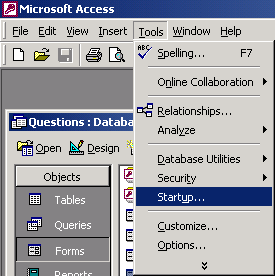
Answer: You need to reconfigure the settings in your Startup options. Under the Tools menu, select Startup.
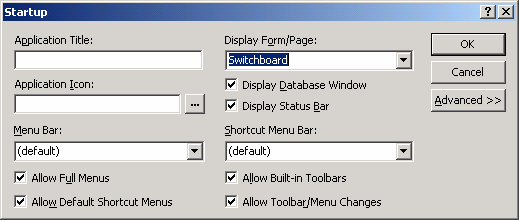
When the Startup window appears, set the "Display Form/Page" option to Switchboard. Then click on the OK button.
Now when you open your Access database, the Switchboard should start up automatically.
Advertisements