



MS Access 2003: Set a default value for a text box when a new record is created
This MSAccess tutorial explains how to setup a default value for a text box when a new record is created in Access 2003 (with screenshots and step-by-step instructions).
See solution in other versions of Access:
Question: In an Access 2003/XP/2000/97 form, I want to check when the user adds a new record (is there any relevant event?) so that I can load a default date value in a text box. I tried to go to a new record each time the form was loaded, but that resulted in numerous unwanted records. How can I avoid this?
Answer: On the Form object, there should be a "Before Insert" event. You should be able to place code there to set the value of the text box.
Download version in Access 2000 (example as demonstrated below)
Let's look at an example. Often times, it is useful to know when a record has been created in your Access database. So we've created a Customers table that contains a field called Create_Date. We will use this field to store the exact date and time of when the record was created.
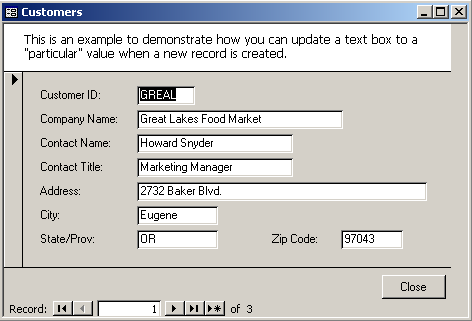
This is an example of a form that we've created. There is code on the "Before Insert" event of this form to update the field called Create_Date. When you are viewing this form in "form mode", you can not see the field called Create_Date.
However, if you view this form in Design View, you will notice that there is, in fact, a field called Create_Date. This field has been set to "not visible" so that the user can not interfere in the "Before Insert" event code that will run.

When a new record is inserted into the Customers table, the Create_Date field will be updated with the current system date/time.
The VBA code is quite simple:
Private Sub Form_BeforeInsert(Cancel As Integer)

   'Set the Create_Date field in the Customers table to the current system
   'date when a new record is created
   Create_Date = Now()

End Sub
Advertisements