



MS Access 2003: Limit values in a combo box
This MSAccess tutorial explains how to limit the values that a user can enter to the list values in a combo box in Access 2003 (with screenshots and step-by-step instructions).
See solution in other versions of Access:
Question: In Microsoft Access 2003/XP/2000/97, I've created a combo box. I'd like to populate the combo box based on a query and then limit the user to only enter a value that is in the list. I don't want the user to be able to enter any values that I do not populate in the combo box. Is there a way to do this?
Answer: Quite often we will only want users to select a value from a predefined list of value in a combo box. To do this, open your form in design view. Right-click on the combo box and select Properties from the popup menu.
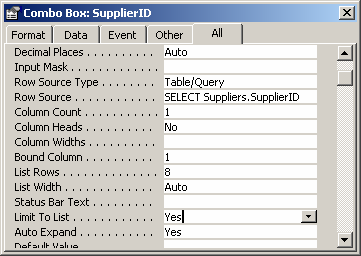
In the combo box, there is a Property called "Limit To List". You will need to set this property to "Yes" on the combo box object.
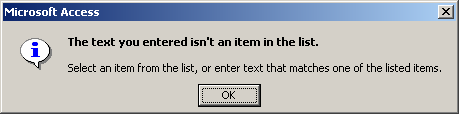
Now when you try to enter a value in the combo box that is not in the list of values, you will get the following message:
Advertisements